Learning How to Deploy Local Large Language Model (LLM)
By Kian Wee Chen
Published:
Category: Essay
20 mins read
I have been using the free-tier OpenAI and Gemini LLMs for supporting my programming activities. They have been very useful and significantly improve my productivity. However, I am not fond of the idea of being beholden to online LLMs API (e.g. openAI and Gemini) for supporting my programming activities. The support stops once I lose connection or they become unaffordable with charges as they remove the free tier models. I see potential in the use of local LLM. I like the privacy and the control I have with local models. Thus I set out to understand the hardware and software stack required for running local LLMs. I also look at the various terms that are commonly thrown around when discussing LLMs e.g. post-training, fine-tuning, harness ... In this article, I sort out what I have learned and provide an overview on the subject.
The diagram below provides an overview of the different levels of deployment with the associated hardware and software required to deploy LLM locally on your laptop. Regardless of the different level of deployment, you will need a sufficiently powerful hardware, at least a workstation grade laptop with dedicated graphics card. I was able to run Gemma 4-E2B comfortably, Gemma 4-E4B at a much slower speed and barely run Gemma 4-12B on my Dell Precision 3490 workstation (14 core CPUs, 16 GB RAM, NVIDIA RTX 500 Ada Generation Laptop GPU, 4GB vRAM). On the software side, you will need a model manager (e.g. Jan, LM Studio, Ollama ...) to run your LLM. A model manager usually includes runtime or inference engine (e.g. llamma.cpp, vLLM ...) and a server to serve your LLM to other software and services. You will then configure your harness (e.g. copilot, Pi ...) to talk to your LLM using the model server API (e.g. OpenAI API). An agent is essentially your LLM + Harness. For the case of the copilot agent, the harness communicates to the LLM deploy on your laptop to write programming codes. I have written a tutorial on how to deploy LLM locally using Jan ai with the vscode copilot extension for use as a coding support (diagram(a)).
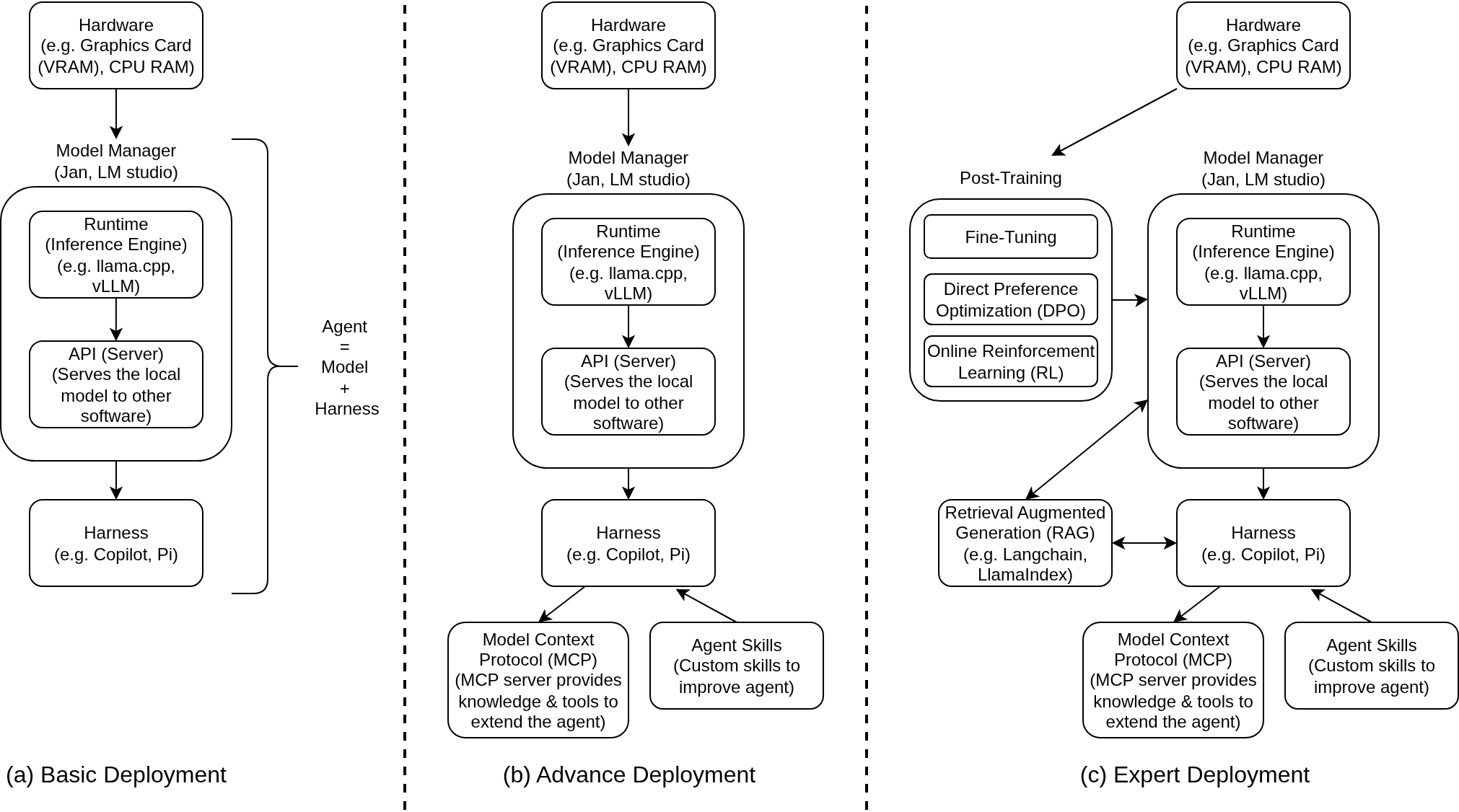
In diagram(b) advance level deployment, you will further customize and extend your agent using agent skills and Model Context Protocol (MCP). Skills and MCP are different methods to extend the capability of agents. Skill is an open standard and its implementation is basically a folder consisting of a SKILL.md file that provide instructions for agents to perform a specific task. An MCP is also an open protocol that provides a standardized way for AI applications (agent, chat ...) to communicate to external data and tools (postgreSQL, Git ...). These techniques will allow you to customize your agent to your own specific workflow. If you are comfortable and driven you can even develop your own agent by choosing the most appropriate open LLM (gemma, qwen, kimi ...) and develep your own harness using frameworks like Langchain.
Diagram(c) shows what I call expert level deployment where model level customization is required for your particular workflow. Retrieval-Augmented Generation (RAG) optimizes the output of the LLM by referencing authoratative data sources outside of the LLM training data. It is a cost effective way to extend your model capabilities to specific domain or organization internal knowledge base. RAG can also be implemented as an agent level service. LangSmith and LlamaIndex are popular frameworks for implementing RAG in your LLM workflow.
You can move lower level to influence your LLM behavior by doing post-training (also known as alignment) on a selected foundation model like gemma-4 or mistral-7B. Pre-training is essentially developing the LLM from scratch while post-training is executed after pre-training to adjust the LLM. There are different types of post-training, they can either be 1.) performed by model vendors (openAI, Google) or 2.) AI application developers to customize the LLM to their specific use cases. Post-training consists different techniques like fine-tuning, direct preference optimization, online reinforcement learning ... Fine tuning is probably the technique most commonly used by application developers. Fine-tuning generally consists of feeding the model input and output pairs, tuning the model to provide the right answers (outputs) to the corresponding questions (inputs). It generally requires much lesser data than pre-training dataset. An example of fine-tuning Gemma can be found here. Unsloth and LLaMA-Factory are popular frameworks for performing post-training on open weights foundational LLMs.
I hope this essay provides a conceptual overview of local LLM deployment and can be useful for you when you are interested in the subject. I have only tested the basic deployment (diagram(a)) on my workstation laptop. I am looking forward to testing out advance deployment (diagram(b)) and writing a tutorial about it when I have the time to do it.
Hope this is helpful and we can continue the conversation in the comments!